
Print a team roster
Select the week, location and team filters on Team Roster, then choose Print. On the mobile roster, use More → Print roster. A settings modal opens before the print version.
Choose availability
Managers and Admins can enable Show team member availability. It starts off. When enabled, approved all-day and timed unavailability appears in red boxes alongside each staff member’s printed shifts. Specific-date ranges include their final date; recurring records respect their finish date. Private leave notes and pending or rejected requests are excluded. Empty dates do not imply a person has confirmed availability.
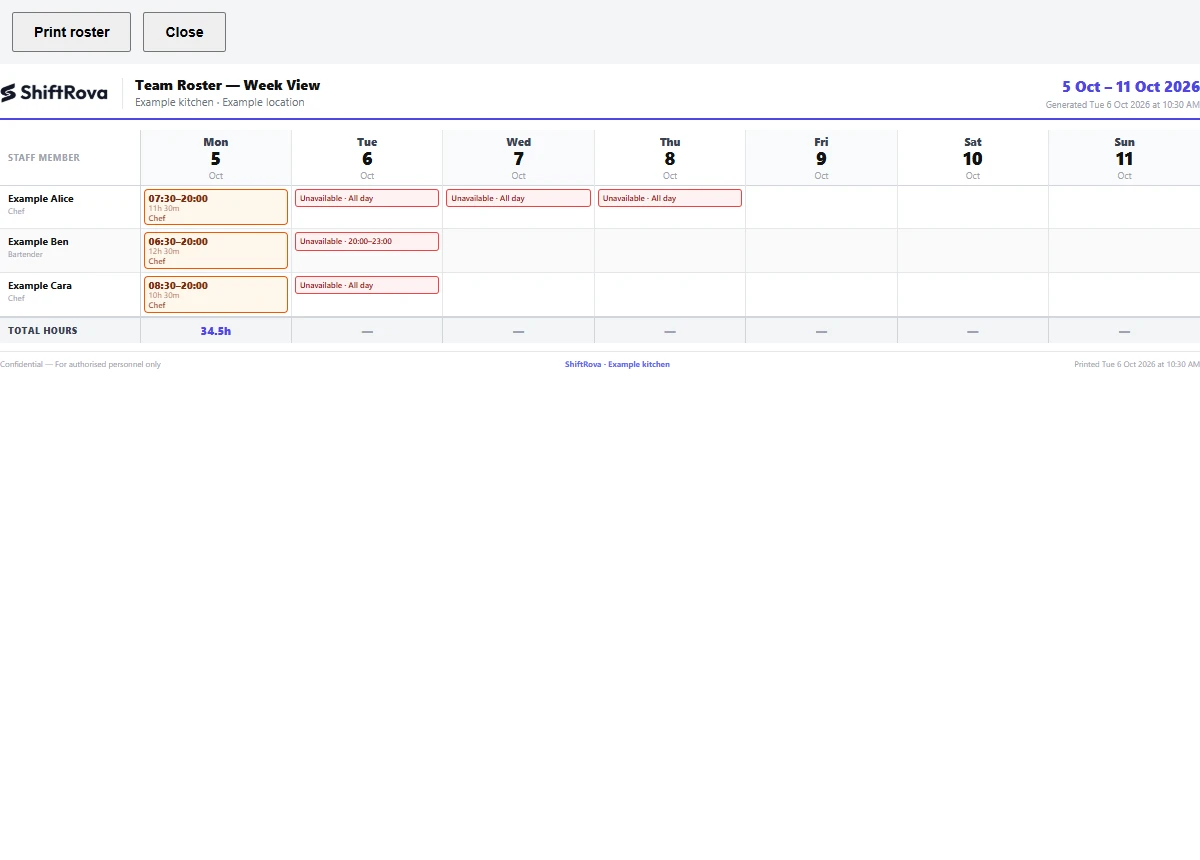
Open and print
Choose Okay to open the print version and the browser’s print controls. Allow popups for ShiftRova if your browser blocks it. The preview also has Print roster and Close buttons, so it remains available after cancelling the native print dialog. Cancel in settings opens no print version. If availability cannot be loaded, retry from the settings modal.
Printing uses the whole selected week, including when the screen shows a day view. Names and roles stay compact; weekly minimum/maximum hour limits and current-day highlighting are omitted. The preview controls are hidden on paper. Dates use the organisation’s timezone.