
Find the award before choosing the pay rate
The award assistant helps an Organisation Admin assess employer coverage, then helps managers and administrators review the employee's classification and pay. An organisation's industry suggests relevant questions and awards; the label alone never decides coverage. A business can employ different people under different awards. An employment contract, a job title, government funding or NDIS registration does not by itself establish an award.
1. Open the organisation award assistant
- Check that the correct organisation is selected in the header.
- Open Settings → Time & Pay → Pay Rates and find Organisation award.
- Choose Find organisation award, or reassess an existing selection. Read the saved selection and its warnings before replacing it.
- If you already know the award, use the direct award-selection option instead. Search by its name or code, then check the linked coverage and classifications. Direct selection does not remove the need to verify coverage.
Organisation award setup needs the current administrator permission. A manager can review a team member's supported pay assessment without being authorised to replace the organisation's coverage setup. If access is unavailable, ask the organisation administrator to review the current permissions.
2. Answer the coverage questions
- Employment system: confirm whether the employer and staff are in the national Fair Work system. If unsure or covered by a state system, stop and verify the correct instrument.
- Registered agreement: check enterprise or other registered instruments. An ordinary individual contract is not itself a registered agreement. An agreement or uncertain answer needs a separate review.
- Employer activity and work: choose the branch describing the actual employer and employee group. Industry-specific questions distinguish services and occupations that can have different coverage.
- Candidate award: where several candidates remain, read each award's coverage summary and exclusions. Select the one whose full official definition you have checked; do not choose the cheapest rate or the first result.
- Explicit confirmation: confirm the relevant coverage and classification checks. Review the reasons, limitations and certainty before saving.
Missing, uncertain or conflicting answers remain Review needed. A certainty indicator describes how the supplied answers match the assistant's supported rules; it is not an independent investigation or a guarantee of legal coverage. Use the official instrument and qualified assistance when a case is unclear.
3. Use the questions for your industry
- Hospitality: distinguish accommodation, pubs, contract catering, restaurants and primarily takeaway service. The existing Hospitality, Restaurant and Fast Food questions remain available.
- Aged Care, Healthcare and NDIS Support: distinguish residential care, home care, disability/social-community support, nursing, allied-health services and other covered occupations. SCHADS has separate service streams. School nurses, aged-care nursing assistants and supported employment need particular coverage checks; neither a participant's funding nor work in a private home chooses a stream.
- Childcare and Education & Training: distinguish teaching from educator/support duties and private, school, university or council employers. School general staff, post-secondary staff and higher-education academic/general staff can use different awards. Check qualifications, recognised service and any classification transition or retained rate.
- Government & Community Services: identify the legal employer and jurisdiction. Local government, private community-service providers and Commonwealth/state public employers are not one award group. Public-sector or enterprise instruments can require a separate assessment.
- Agriculture, Automotive, Construction, Field Services & Maintenance and Manufacturing: identify the actual business and trade or work. Production, servicing, installation, on-site construction, horticultural/pastoral work and specialist activities can have different instruments. A trade qualification alone does not settle employer coverage.
- Logistics and Transport: distinguish warehousing, distribution, driving and the actual transport service. Vehicle, journey and employer definitions matter; do not assume every driver uses one transport award.
- Beauty & Wellness, Sport & Recreation and Events & Entertainment: compare the relevant service and work, such as hair/beauty, fitness, qualified health services, recreation or performance. The venue name alone does not resolve coverage.
- IT & Telecommunications and Professional Services: assess the actual professional, technical, telecommunications, clerical or other work, qualifications and employer exclusions. An office or technology job title is not an automatic Clerks or Professional Employees classification.
- Retail, Security and Cleaning & Facilities: check specialist retail exclusions, security-service versus in-house employment, and contract cleaning versus another employer's in-house work. General Retail, Security Services and Cleaning Services have existing supported ordinary-rate assessments.
- Other: use the employer/work questions and official award search. An unknown industry is not a finding that the person is award-free.
These are starting points. The assistant's relevant-award list is not a complete list of every enterprise, state, specialist or occupational instrument that could apply.
4. Check whether ShiftRova calculates this award's rate
Calculated ordinary-rate assessments remain available for the documented Hospitality MA000009, Restaurant MA000119, Fast Food MA000003, Security Services MA000016, General Retail MA000004, Cleaning Services MA000022 and supported SCHADS MA000100 disability streams. The saved award's active rate version and every required worker answer must be supported. SCHADS support is limited to the documented social/community and home-care disability classifications and progression points; it does not include every SCHADS stream.
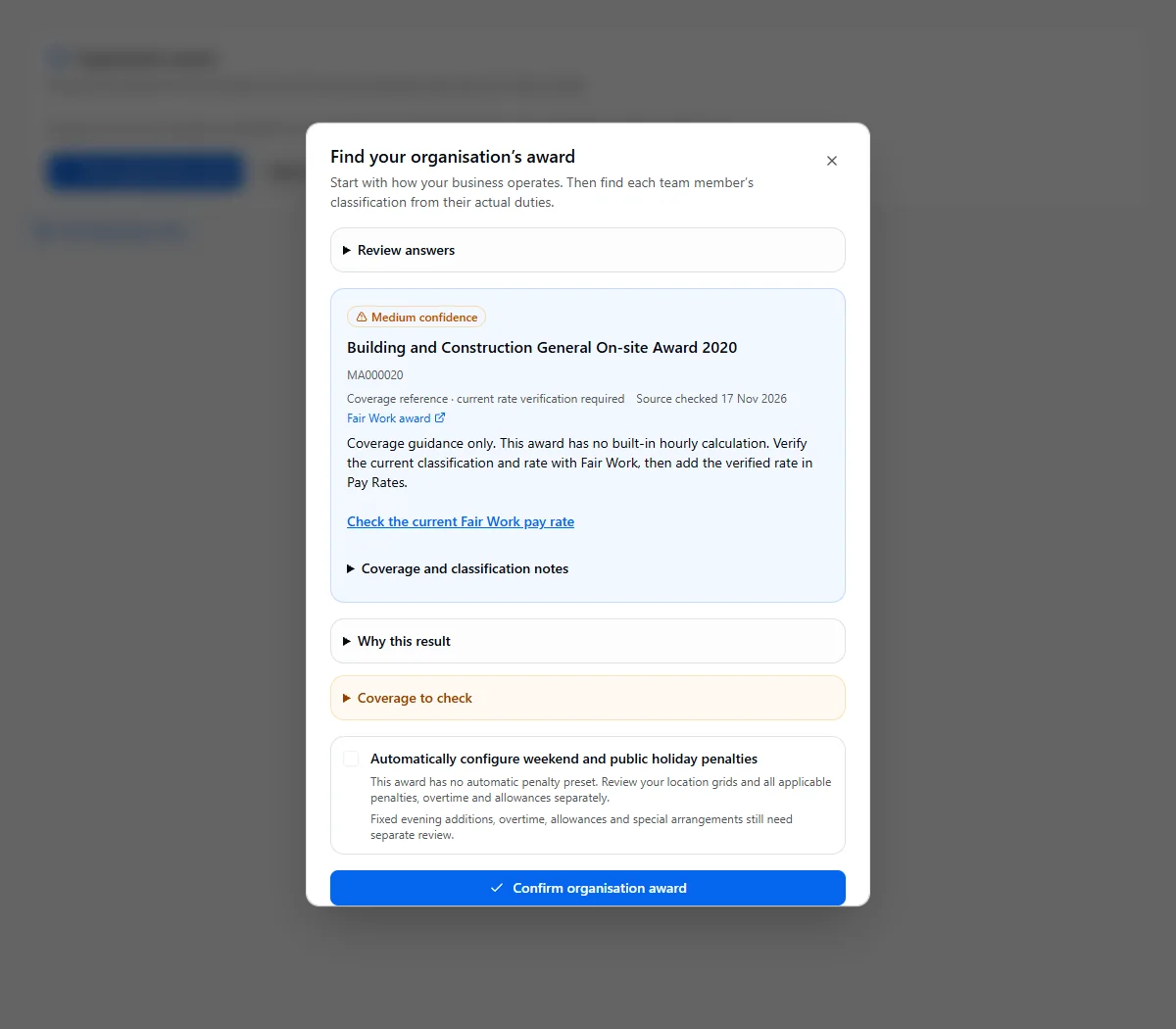
Coverage references for additional awards help identify the relevant instrument and its classification questions. They do not invent or calculate a dollar minimum. Open the official award, current Fair Work pay guide or Pay and Conditions Tool; verify the employee's exact classification, service/progression point, employment type and effective pay period. Record a verified rate through the existing pay-rate controls after that check. A confirmed coverage reference is not a completed automatic wage calculation.
5. Review a team member and preserve agreed pay
- Open Team → Member → Employment. Use Find award pay rate for a supported calculation, or follow the displayed official-source/manual-rate route for a coverage-only award.
- Confirm actual duties and responsibility, qualifications, recognised service, age where relevant and employment type. Do not infer age discounts, apprentice wages or a lowest progression point.
- Read the source, effective date and any review cutoff. A stale or unsupported rate version needs a current-source check.
- Retain higher contractual pay unless a properly reviewed change is intended. Confirm the actual amount before explicitly saving or applying it.
- Review penalties, overtime, allowances, minimum engagements, weekly minimums and any salary arrangement separately.
Special arrangements, training/apprentice wages, supported wages, annualised or loaded salaries, allowances and classification transitions can need a separate assessment. The supported calculator is not a complete payroll or award-compliance engine. Automatic Hospitality penalty presets must not be reused for other awards.
Opening the assistant, answering questions, selecting an industry or saving organisation coverage does not automatically change staff wages, shift times or location penalty grids. A worker's pay changes only through the explicit authorised pay-setting action. Reassess affected staff deliberately if coverage changes.
Review answers or look up a classification
Choose one answer to continue. Open Review answers to jump to the detail you want to change. If you already know the employee’s classification, search by level, duties or keywords and check the full definition before applying it.
If ShiftRova needs a current rate check, take the award code, any identified classification and the appropriate pay period to the Fair Work pay calculator. Confirm employment type, age, any service or progression requirement and the first full pay period. Return to Pay Rates to record the amount once verified. Retain any higher contractual pay.
Check rates from 1 December 2026
From 1 December, ShiftRova refers affected Fast Food juniors aged 18–20 and Retail juniors aged 18–19 in levels 1–3 to the Fair Work junior wage guidance. The first increase applies from the first full pay period starting on or after that date. Select the pay period you’re assessing and confirm whether more than six months of service counts with the employer. The Pharmacy Award uses the official-rate route. For SCHADS disability work, the finder also links to the SCHADS wage changes and the current calculator. Review saved rates explicitly through the existing pay settings.
Find this help again
Use Help articles in the header search or search the Knowledgebase for award questionnaire, organisation award, pay rate by industry, an industry name or an award code. Searching help does not grant access to private pay settings.
Official tools and related guides
- Fair Work Pay and Conditions Tool — PACT
- Fair Work Find My Award
- Current Fair Work pay guides
- Official list of awards
- Supported industry award pay-rate calculations
- Setting employee pay rates
The expanded coverage sources were checked on 17 November 2026. That date is a coverage-reference check, not a new effective date or fresh verification of every bundled wage table. Current official instruments prevail where a summary or pay guide differs.