
Upload without leaving the profile
When Compliance is enabled and your account has the relevant permission, select a compliance card in a team member profile. Staff can also use the cards in their own Profile for their own records. Payroll access to the profile summary does not grant document access or upload permission.
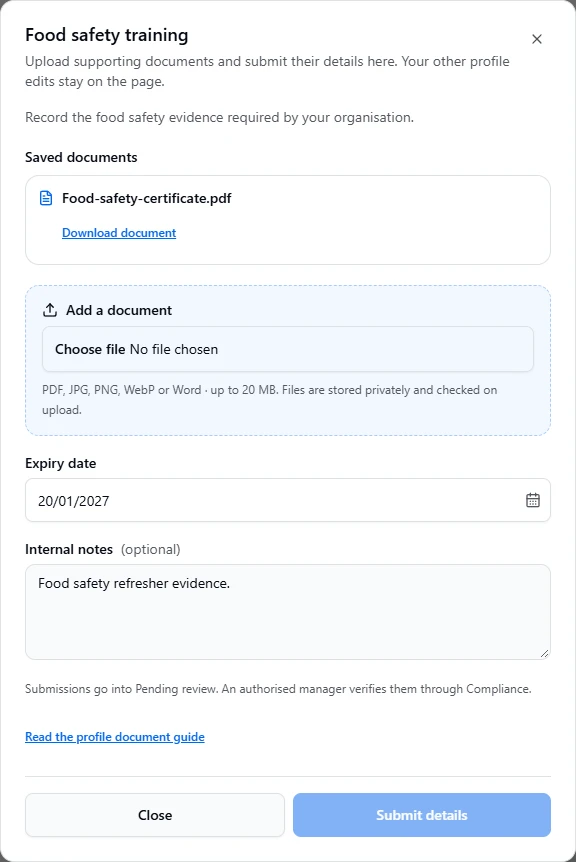
1. Check the person and compliance item
- Managers open Team, select the person and find Compliance. Staff use their own Profile.
- Select Upload or update on the required card. If the card is read-only, ask an organisation administrator to check your compliance permission and the organisation's Compliance setting.
- Review the item description and saved document names. Download an existing document if needed; downloads still require current authorised access.
2. Add the document and details
- Choose one PDF, JPG, PNG, WebP or Word document up to 20 MB. The server checks the file's contents as well as its extension.
- For an item with an expiry, enter the document's actual expiry date. Do not use an invented future date to make a record look current.
- Authorised managers can add internal notes. Staff do not receive the internal-notes field.
- Select Upload & submit. For a record that already has a document, you can adjust details and select Submit details.
The file upload and details submission are separate confirmed steps. A successful file is retained if details fail. Retry the details without uploading that file again. If the upload result is uncertain, select Check saved documents before choosing the file again. Read the saved file list before retrying; a lost network response does not prove that nothing was saved.
3. Review the result
Successful submission displays Pending review on the card. Uploading or submitting does not verify the evidence. An authorised manager reviews and verifies it in the Compliance register. Existing compliance history and private storage continue to apply. The profile status describes recorded evidence and does not certify legal compliance.
Keep other changes safe
Compliance saves refresh the cards independently. Unsaved personal, employment, tax and bank edits stay on the profile and still need Save Profile. Closing a document with unsaved changes offers a choice to save or discard that document draft; it does not silently discard the rest of the profile. Closing or discarding a draft does not remove files that have already been uploaded.