
Manage your own account
These controls are available to team members, managers and administrators. They do not depend on your employer enabling an optional module. Deleting your personal account does not cancel an organisation subscription.
1. Open personal controls
- Sign in to the account you intend to remove.
- Open your Profile and scroll to Danger Zone — Delete Account. You can also open Settings → Personal Settings. If your trial workspace is paused, sign in and choose Manage personal account deletion on the paused workspace screen.
- Wait for the current account status to load. If it cannot be confirmed, use Refresh status before continuing.
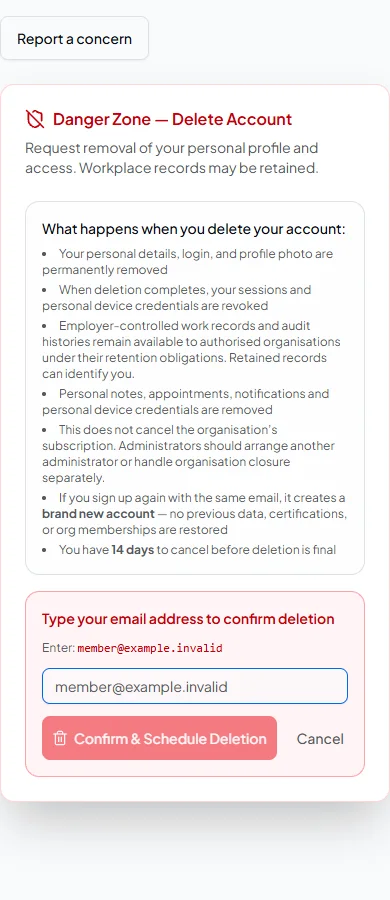
2. Review what stays and what is removed
Completion removes personal profile and financial details, profile photo, private personal notes/appointments, personal notifications and personal access credentials. Employer-controlled shifts, attendance, workplace evidence and audit histories can remain under retention obligations and can still identify you. Contact your employer or privacy@shiftrova.com about retained records. Administrators should arrange another administrator or organisation closure separately.
3. Schedule removal
- Choose Request Account Deletion.
- Enter the email shown for your signed-in account.
- Choose Confirm & Schedule Deletion.
- Read the scheduled date. You have 14 days to cancel before deletion becomes final. If a request response is lost, refresh the status; retrying a confirmed request does not postpone the original date.
4. Cancel before the deadline
- Return to the same account controls.
- Choose Cancel Deletion Request.
- Wait for confirmation that the scheduled request has been cleared. A failed or uncertain response requires a status refresh.
5. Request help without signing in
Open the public account-deletion page and use its email request instructions. Include your account email; do not send passwords, tax details or bank details. Support verifies identity before acting. A new signup after completed deletion creates a new account and does not restore old memberships.