
Keep workplace communication respectful
Harassment, threats, discriminatory abuse, illegal or sexually exploitative content and unauthorised sharing of private information are prohibited by the Terms of Service. Workplace reports go privately to eligible admins in the selected organisation. This is not an emergency service; use local emergency services if someone is in immediate danger and follow your employer’s incident process as well.
1. Report content or a user
- Open Messages and select the relevant person or channel.
- Choose Conversation options beside the conversation name, then Report a concern. Profile and Personal Settings provide separate service and account support.
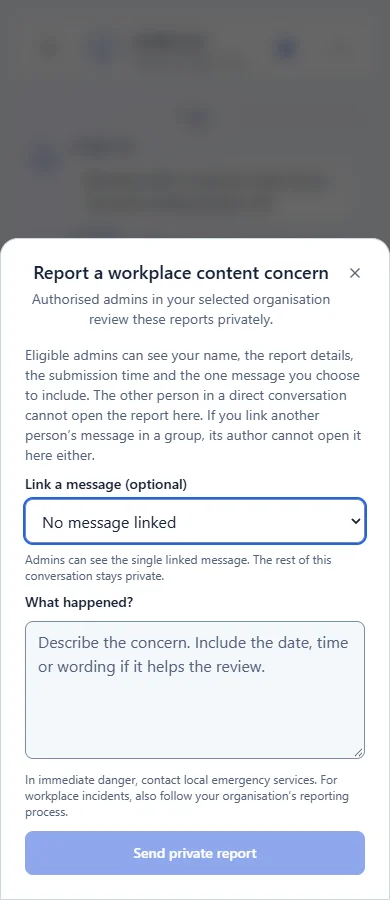
- Check the context displayed. Describe what happened in 10–4,000 characters. Include the relevant person, channel or feature, date/time, message or record identifier and wording needed to investigate. Share only necessary information.
- Choose Send private report and wait for the receipt. The report includes your name, conversation context, description and submission time. You can link one message from that conversation.
- Keep the receipt for follow-up with an eligible organisation admin. If the response is uncertain, retry without editing to check the same receipt. Editing the description starts a new report.
2. Block direct contact
- In Messages, open a direct conversation with the teammate.
- Open Conversation options, choose Block direct messages and confirm.
- Check that the menu now offers Unblock direct messages.
Blocking stops direct messages in both directions in the selected organisation. Direct conversation history and unread messages are hidden while blocked; the retained records are not deleted. Shared work channels remain accessible. The same person in a different organisation has a separate contact preference. A block made by the other person cannot be removed by you.
3. Unblock when appropriate
Open the teammate’s direct conversation and choose Unblock direct messages. Wait for confirmation. Your own block is removed; any independent block by the other person still applies. If saving is uncertain, reopen the conversation to refresh its preference before sending.
4. Private review
Eligible organisation admins open Workplace reports in Messages. For full details on what an admin can see, open the message safety guide.